DS110 Monitor Arm — Gas Spring Precision, Every Screen Size, Every Desk Type
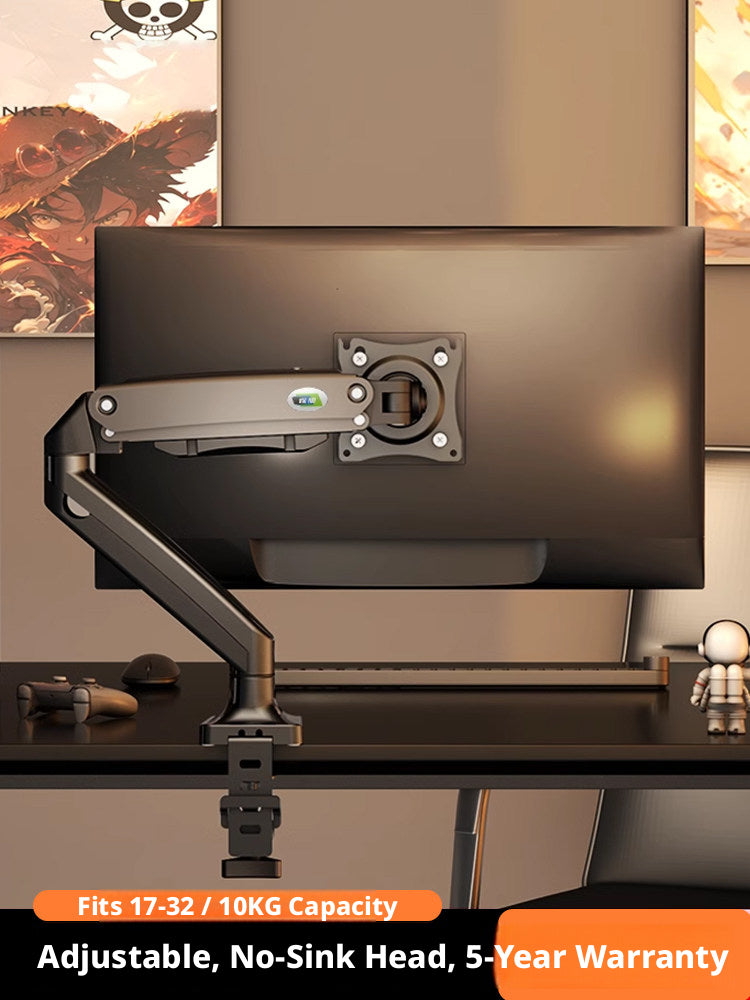
A monitor that can’t move is a monitor that’s working against you. Whether you’re hunching toward a screen set too low, fighting glare from a fixed angle, or losing desk space to a bulky static stand, the DS110 monitor arm is engineered to solve all three at once. Designed for remote professionals, creative workstation builders, gamers, and anyone running a multi-display setup, the DS110 delivers smooth, one-hand repositioning across a full range of heights, angles, and orientations — including inverted ceiling and shelf mounts.
Each DS110 ships as a single arm assembly. The base and lower arm segment are cast from aluminum alloy (full aluminum on the Luxury variant); upper arm and head components use reinforced engineering plastic on standard models. The arm’s panel center height adjusts from 155mm to 470mm (6.1–18.5") above the desk surface, with a maximum horizontal reach of 515–587mm (20.3–23.1"). VESA compatibility covers both 75×75mm and 100×100mm patterns. Variants span monitor sizes from 10–18 inches (laptop models) up to 22–40 inches (Heavy Load Full Spec), with weight capacities from 3 kg up to 15 kg (6.6–33 lbs). The base installs via clamp (desks 15–95mm / 0.6–3.7" thick) or grommet (desks 15–92mm / 0.6–3.6" thick, hole ≥10mm). Two USB pass-through ports are built into the base column on select variants.
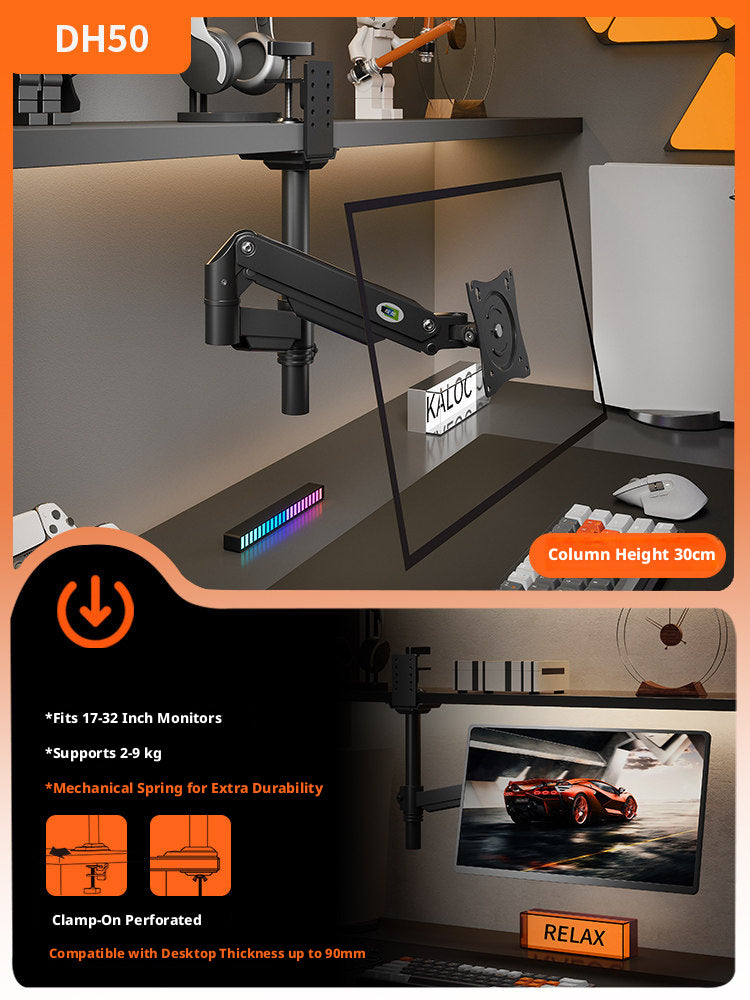
The DS110 is equally at home as a single-monitor ergonomic desk arm for home office setups, a dual-screen gas spring monitor mount for content creators running a monitor-plus-laptop configuration, or an inverted overhead monitor arm for space-saving gaming stations where the arm mounts from a shelf or overhead rail rather than the desk surface. The integrated cable management channel keeps HDMI, DisplayPort, and USB cables routed cleanly along the arm at all times.
🖥️
Compatibility: Fits monitors 10–40 inches and 3–15 kg (varies by variant). VESA 75×75mm and 100×100mm. Desk thickness 15–95mm clamp / 15–92mm grommet. Supports flat, curved, and ultrawide panels. Select your Type, Size & Load Capacity, and Structure Type above before purchasing.
⚠️
Clamp Mount Restrictions: Do not use the clamp mount on glass, stone, or soft wood desktops; desks with a cross-beam or horizontal brace underneath that reduces clamping clearance; or desks with a beveled, angled, or raised-lip edge profile. Use the grommet mount in these cases, or contact us for guidance.
✅ Key Features of These DS110 Gas Spring Monitor Arms
-
🌀
True Gas Spring Float Mechanism — The pneumatic spring holds your monitor at any height between 155mm and 470mm (6.1–18.5") without drifting, sagging, or requiring a locking knob. Push up or pull down and release — the arm stays exactly where you leave it.
-
📐
360° Swivel + ±50° Tilt + 180° Arm Rotation — Full articulation at every joint gives you a fully adjustable gas spring monitor arm that handles portrait mode, landscape, side-by-side dual-screen, and inverted overhead configurations without adapters.
-
🔧
User-Adjustable Spring Tension — A clearly marked ‘+’/‘−’ tension adjustment screw lets you dial in the holding force to match your monitor’s exact weight. Raise the arm to horizontal, turn the screw, and the arm holds position — no tools required beyond the included hex key.
-
📏
Long Horizontal Reach: 515–587mm — The arm extends 515–587mm (20.3–23.1") from the base, giving you the reach to position a monitor well away from the desk edge — ideal for deep-desk monitor arm setups or multi-monitor configurations where screens need to be offset.
-
🖥️
Flat, Curved & Ultrawide Panel Support — The DS110 is rated for flat screens, curved monitors, and ultrawide (superwide) panels up to 40 inches and 15 kg on the Heavy Load variant — one of the few heavy-duty monitor arms for large ultrawide screens in this price range.
-
🔌
2 Built-In USB Pass-Through Ports — Two USB ports integrated into the base column (on select variants) let you connect peripherals directly at the arm base, reducing cable clutter on your desk and keeping your workstation tidy without a separate USB hub.
📐 Technical Specifications — DS110 Gas Spring Monitor Arm
| Model |
DS110 |
| Compatible Monitor Size |
17–32" / 17–35" / 22–40" (monitor variants) | 10–18" (laptop variants) — see Size & Load Capacity |
| Weight Capacity |
3–10 kg (6.6–22 lbs) / 9 kg (19.8 lbs) / 10 kg (22 lbs) / 15 kg (33 lbs) — see variant |
| VESA Compatibility |
75×75mm and 100×100mm |
| Supported Panel Types |
Flat screen, curved screen, ultrawide (superwide) |
| Spring Type |
Gas Spring (Pneumatic Drive) / Mechanical Spring — see Structure Type variant |
| Base & Lower Arm Material |
Cast Aluminum Alloy (base/lower arm); full aluminum on Luxury variant |
| Panel Center Height Range |
155–470mm (6.1–18.5") |
| Maximum Horizontal Reach |
515–587mm (20.3–23.1") |
| Arm Joint Rotation |
180° |
| Base Rotation |
360° |
| Tilt Range (Monitor Head) |
±50° |
| Clamp Mount Desk Thickness |
15–95mm (0.6–3.7"); underside clearance ≥57mm (2.2") |
| Grommet Mount Desk Thickness |
15–92mm (0.6–3.6"); hole diameter ≥10mm |
| USB Pass-Through Ports |
2 (on select variants) |
| Inverted / Upside-Down Mount |
Available on Upside-Down Classic, Upside-Down Flagship, and Upside-Down Laptop variants |
| Dual-Screen Support |
Available on Dual Screen Laptop & Monitor and Dual Screen Flagship variants |
| Cable Management |
Integrated cable routing channel along arm |
| Color Options |
Mystery Black / Moonlight White / Dark Night Black / Glacier Silver — see Type variant |
❓ Frequently Asked Questions
What monitor sizes does the DS110 arm support?
Depending on the variant selected, the DS110 supports monitors from 17 to 32 inches, 17 to 35 inches, or 22 to 40 inches. Laptop variants support 10 to 18 inch screens. To confirm your screen size, measure diagonally across the panel (not including the bezel) or check the manufacturer’s spec sheet. Select the correct Size & Load Capacity option before adding to cart.
How much weight can the DS110 monitor arm hold?
Weight capacity varies by variant: 3–10 kg (6.6–22 lbs) for the Luxury Full Aluminum Model, 9 kg (19.8 lbs) for Classic and Dual Screen Laptop & Monitor models, 10 kg (22 lbs) for Flagship models, and up to 15 kg (33 lbs) for the Heavy Load Full Spec Model. Always check your monitor’s weight without stand in its spec sheet before selecting a variant. Exceeding the rated capacity may cause the arm to sag or fail to hold position.
What VESA patterns does the DS110 support?
The DS110 supports VESA 75×75mm and 100×100mm mounting patterns. To check your monitor’s VESA pattern, look at the four screw holes on the back of the panel and measure the horizontal and vertical distance between them. If the holes are recessed in a cavity, use the included black spacer pads and longer screws to bridge the gap — this works for recesses up to approximately 10mm deep. For deeper recesses, contact us before ordering.
My monitor has no VESA holes on the back. Can I still use this arm?
Yes, with an optional accessory. For monitors without VESA holes, you can use the H1 bracket accessory — a U-shaped cradle that grips the monitor frame from behind — or adhesive VESA adapter pads that attach to the back of the panel. Contact us with your monitor’s model number to confirm which accessory is compatible before purchasing.
What is the difference between the clamp mount and the grommet mount?
The clamp mount grips the edge of your desk without drilling. It fits desks 15–95mm (0.6–3.7") thick with a minimum underside clearance of 57mm (2.2"). The grommet mount passes through an existing hole (minimum 10mm diameter) in your desk for a cleaner, more permanent installation, rated for desks 15–92mm (0.6–3.6") thick. The clamp mount is not suitable for glass, stone, or soft wood desktops; desks with a cross-beam underneath; or desks with a beveled or angled edge profile.
Why does my monitor keep sliding down after installation?
The arm ships with spring tension set to a mid-range default. If your monitor is heavier and slides down after release, raise the arm to a horizontal position, then turn the tension adjustment screw in the ‘+’ direction to increase holding force. If the monitor is lighter and the arm springs upward, turn the screw in the ‘−’ direction. Always support the monitor with your hand while adjusting, and do not force the screw beyond the maximum or minimum stop.
Is the DS110 suitable for ultrawide or curved monitors?
Yes. The DS110 is explicitly rated for flat screens, curved monitors, and ultrawide (superwide) panels, provided the monitor falls within the supported size and weight range for the selected variant. For monitors between 22 and 40 inches or up to 15 kg (33 lbs), select the Heavy Load Full Spec Model. For standard curved ultrawides up to 35 inches and 10 kg, the Flagship models are appropriate.
Can I mount the arm upside down from a shelf or overhead rail?
Yes — select the Upside-Down Classic Model, Upside-Down Flagship Model, or Upside-Down Laptop Model variants, which are specifically engineered for inverted ceiling, shelf, or overhead rail mounting. These are ideal for space-saving overhead monitor arm setups, under-cabinet display installations, or gaming stations where the monitor needs to hang from above rather than rise from the desk.
🛒 Select your Type, Size & Load Capacity, and Structure Type above, then add to cart.